Abstract:CopyFX, often referred to as CopyFX by RoboForex, is the copy trading platform connected to the RoboForex brokerage. It’s designed to serve both experienced traders, known as "Leaders," and investors, also called "Copiers." The two platforms RoboForex and CopyFX are fully integrated, working seamlessly together.

CopyFX, often referred to as CopyFX by RoboForex, is the copy trading platform connected to the RoboForex brokerage. Its designed to serve both experienced traders, known as “Leaders,” and investors, also called “Copiers.” The two platforms RoboForex and CopyFX are fully integrated, working seamlessly together.
CopyFX Trading Platform
As RoboForexs official copy trading system, CopyFX is compatible with MT4, MT5, and R StocksTrader accounts. It supports various account types, including cent (micro) accounts, which are ideal for beginners or testing strategies, as well as standard and professional accounts for more advanced trading. Users can access copy trading directly through the RoboForex platform across multiple terminals.
Products, Deposits & Withdrawals
CopyFX offers access to a wide variety of markets, including Forex, Stocks, Commodities, ETFs, Metals, Indices, and Futures. For deposits and withdrawals, the platform supports several methods such as bank transfers, credit/debit cards, and digital wallets like AstroPay. Transaction limits and fees are flexible, catering to different types of users.
CopyFX Trading Accounts
As mentioned earlier in this CopyFX review, the platform operates under the RoboForex brokerage. This means you can access all the trading accounts offered by RoboForex when starting your copy trading journey on CopyFX.
Prime Account
Ideal for professional or high-frequency traders, the Prime account offers excellent trading conditions, including low spreads and fast execution.
ECN Account
This account type is tailored for traders who need ultra-fast execution and access to the tightest spreads by connecting directly to major liquidity providers.
R StocksTrader Account
The R StocksTrader account is specifically built for investors focused on trading stocks, ETFs, indices, and bonds, offering a user-friendly platform and a wide asset range.
Pro Cent Account
If you're transitioning from demo trading or experimenting with small Expert Advisors (EAs) or algorithms, the Pro Cent account is a great place to start with real, yet minimal, capital risk.
Pro Account
The most widely used account type on CopyFX, the Pro account suits both beginners and intermediate-level traders who are involved in Forex and CFD trading. It offers a balance between ease of use and solid trading features.
CopyFX Mobile App
Yes, RoboForex offers a mobile solution for using CopyFX through the R Mobile Trader app. This app enables you to manage your investments, track performance, and copy trades directly from your mobile device.
How to Get Started with the CopyFX App:
1. Sign up with RoboForex and open a CopyFX-supported account.
2. Download the app use the R Mobile Trader app for easy access to CopyFX features.
3. Browse and choose a trader by reviewing their strategies, performance, and risk levels.
4. Start copying with just one tap, and all trades by your chosen trader will be mirrored in your account automatically.
CopyFX RoboForex Affiliate Program
CopyFX also offers an affiliate program. Heres how to get involved:
1. Open an MT4 account on the CopyFX platform if you haven't already.
2. Navigate to your settings and configure your subscription details on the “CopyFX Settings” page.
3. Activate the affiliate option by checking the “Affiliate Program” box and selecting the commission percentage you'd like to offer your partners.
CopyFX User Reviews
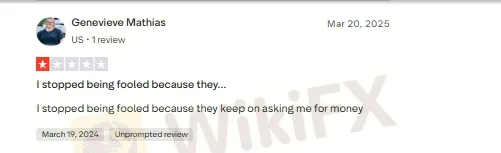
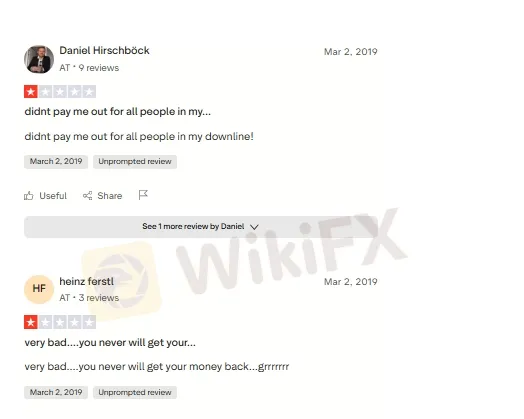
When we checked the CopyFX traders' reviews, we found that people were complaining about payment issues and delays. You can look at the screenshot.
Join WikiFX Community
Stay alert and informed with WikiFX- your one-stop destination for everything related to the Forex market. Whether you're looking for the latest market updates, scam alerts, or reliable information about brokers. Join the WikiFX Community today by scanning the QR code at the bottom and stay one step ahead in the world of Forex trading.
Steps to Join
1. Scan the QR code below
2. Download the WikiFX Pro app
3. After installing, tap the Scan icon at the top right corner
4. Scan the code again to complete the process
5. You have joined!